Contractor Website Design: What Actually Wins Jobs
What should a contractor website include in 2026? The pages, proof, and interactive tools that turn homeowner research into signed jobs, shown on a real build.
A contractor website has one job: win the job before the first phone call. By the time a homeowner contacts a builder, they have usually spent weeks researching, comparing portfolios, and trying to figure out what their project might cost. The websites that answer those questions collect the calls. The ones that offer a phone number and a slogan get skipped.
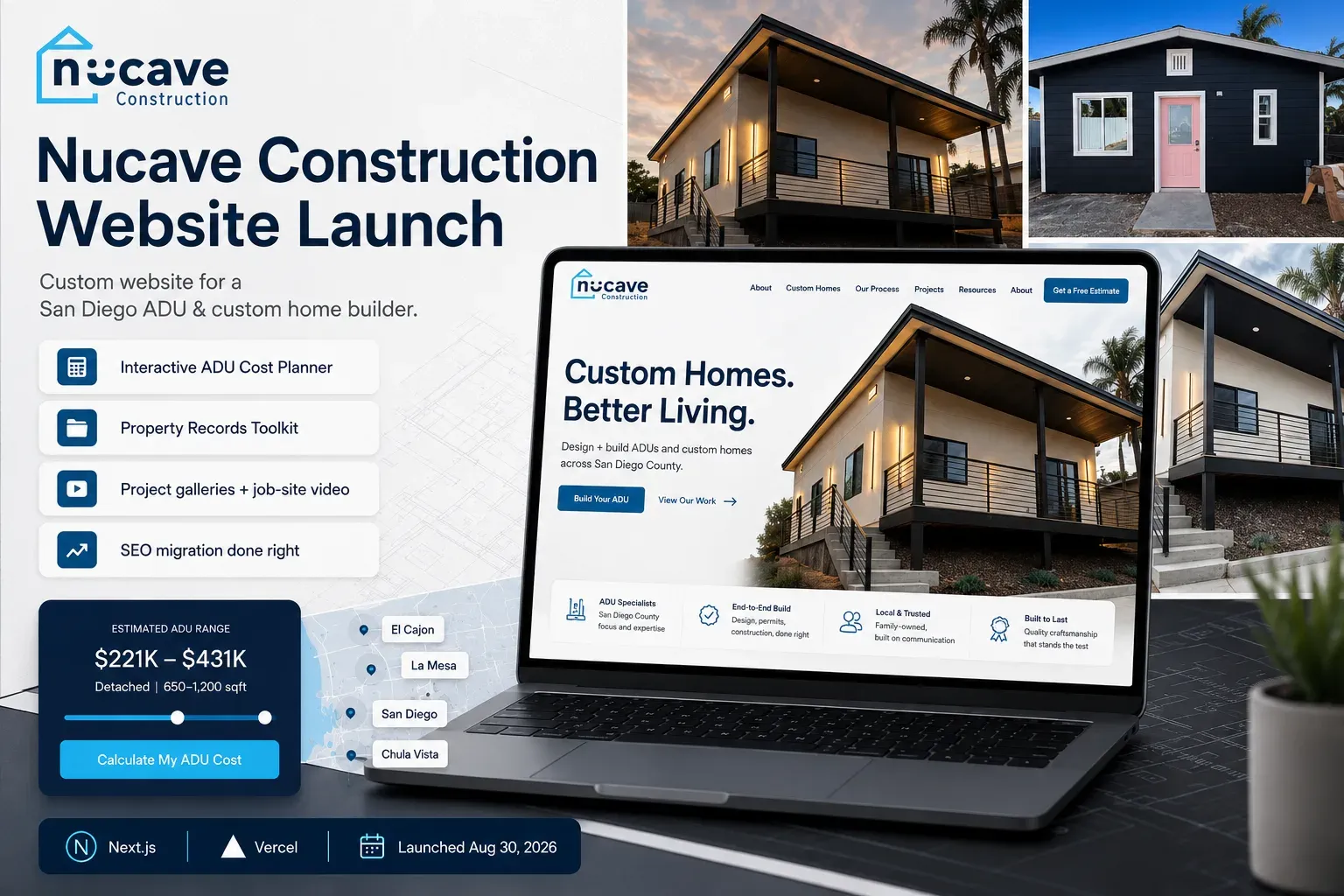
This guide covers what a contractor website actually needs in 2026: the proof, the answers, and the tools that turn research traffic into signed work. We just shipped a roughly 100-page website for Nucave Construction, a San Diego County ADU and custom home builder, so we will use that build as the running example throughout.
Who is your website really talking to?
Construction is a high-ticket, high-trust purchase. Nobody impulse-buys an ADU, a kitchen remodel, or a custom home. Your visitor is somewhere in a research process that can run for months, and they arrive with three questions: can this company do quality work, what will my project roughly cost, and can I trust them with a six-figure decision.
Most contractor websites answer none of the three. They describe services in general terms, show a handful of photos, and end with a contact form. The homeowner cannot act on any of it, so they keep researching, and the contractor whose site finally answers their questions gets the call.
The six things a contractor website needs
WHAT WINS THE JOB
- Project galleries with real photos and videoPROOF
- Cost answers, not 'contact us for a quote'THE #1 QUESTION
- Pages for each city you serveLOCAL RANKINGS
- License numbers, reviews, years in businessTRUST
- Fast, mobile-first pagesWHERE THEY READ
- Instant, informed lead follow-upSPEED WINS
Each of these earns its place. Galleries with real project photos beat stock imagery because homeowners can tell the difference instantly, and video from the job site proves the work is yours. Cost content matters because price is the question every visitor has and almost no contractor answers publicly. City pages matter because a homeowner searches for builders in their city, not builders in general.
Trust signals close the loop. A CSLB license number, real review counts, and years in business are cheap to display and expensive to fake, which is exactly why they work. On the Nucave build, the site leads with what is verifiable: licensed since 2016, more than 100 projects delivered, and project pages that show finished photos first and build progress last, in the order a homeowner wants to see them.
Speed and follow-up are the two that get forgotten. Most homeowners do this research on a phone, often at night, and a site that loads slowly reads as a company that runs the same way. Then, when the inquiry finally comes, the contractor who responds first with real information usually wins the conversation. A lead that arrives graded and pre-filled makes that first response both fast and informed.
Why an interactive cost tool beats a contact form
Here is the pattern we see across service businesses: the biggest question in the visitor's head is what will this cost me, and the standard contractor answer is a contact form. That mismatch is where most website leads die. The homeowner is not ready to talk to a salesperson; they want a number, even a rough one, before they commit to a conversation.
The centerpiece of the Nucave build is an interactive ADU Cost Planner: a 5-step tool built on the builder's own project pricing data. A homeowner answers a few questions about their property and plans, then gets an instant estimate range and a readiness score for their project. No waiting, no sales pressure, and the estimate is grounded in real projects rather than generic national averages.
CONTACT FORM VS COST TOOL
- Answers the visitor's #1 question instantlyAn estimate range beats silence
- Captures the lead mid-processEmail arrives even if they never finish the steps
- Delivers an informed leadAnswers arrive pre-filled like an intake sheet
- Asks for contact info before giving anythingThe classic form: all take, no give
- Tells homeowners to call for pricingThey will, but they call someone else first
The lead-capture detail matters as much as the calculator itself. The Nucave planner verifies the address is real and sends the builder a lead the moment someone enters an email, even if they abandon the remaining steps. Every inquiry lands in the inbox graded and pre-filled, so the follow-up call starts informed instead of starting from zero.
You do not need a full calculator to apply the principle. Even a published price-range page, a cost guide for your main service, or a simple two-question estimator puts you ahead of competitors whose answer to the number one question is a form and a promise to call back.
Local content: city pages and plain-English guides
A homeowner in Carlsbad searches for builders in Carlsbad. If your only page says San Diego County, you are invisible to that search, and so is your Google Business Profile when the searcher is far from your office. City pages fix this: one page per city you serve, with content specific enough to be genuinely useful.
The Nucave build takes it further with 7 city-by-city ADU regulation guides written in plain English. ADU rules differ by city, the official sources are hard to read, and homeowners search for exactly this information. Pages like that do double duty: they rank for local searches, and they are the kind of clear, factual content AI assistants cite when someone asks a question in ChatGPT or Google's AI Mode instead of a traditional search.
The same build also includes free lookup tools, a sewer lateral lookup and a CAL FIRE fire zone lookup, that answer property questions homeowners cannot easily answer anywhere else. Useful tools earn links, return visits, and trust before the first conversation. If you want the deeper playbook on structuring pages that rank, our guide on service pages that rank and convert covers it.
Redesigning? Protect the rankings you already have
The most expensive website mistake contractors make is not a bad design. It is replacing an old site carelessly and losing the Google rankings it took years to earn. Change your URLs without redirects, switch your domain or host casually, and your traffic can drop the week you launch, exactly when you expected it to grow.
A SAFE WEBSITE MIGRATION
- Map every old URLBEFORE LAUNCH
- Keep the host Google knowsBEFORE LAUNCH
- Flip indexing on and submit the sitemapLAUNCH DAY
- Verify and trackWEEKS AFTER
On the Nucave launch, the migration kept the exact www host Google had ranked for years, shipped a 301 redirect for every moved URL, submitted the sitemap within the hour, and preserved analytics continuity with the old property. Post-launch PageSpeed scores: 87 performance on mobile, 96 accessibility, 100 best practices, and 100 for SEO. We wrote a full guide on redesigning without losing rankings if you are planning one.
Template or custom: which do you actually need?
Honest answer: not every contractor needs a 100-page custom build. A newer business with a modest budget is well served by a clean, fast template site that nails the six fundamentals above. Templates fall short when your business outgrows them: when you need interactive tools, city-by-city content at scale, or performance a page builder cannot deliver.
Custom-coded sites earn their keep through the things templates cannot do: a cost calculator built on your real pricing, lead capture wired exactly how your sales process works, and speed scores that both Google and impatient homeowners reward. The right question is not template versus custom in the abstract. It is which fundamentals your current site fails at, and what fixing them is worth in won jobs.
Where to start this week
A contractor website wins jobs when it proves the work with real photos and video, answers the cost question instead of dodging it, shows up for every city you serve, displays the trust signals you have already earned, loads fast on a phone, and turns inquiries into informed follow-up calls. Interactive tools amplify all of it, and a careless redesign can undo years of it.
- Open your site on your phone and time how long the homepage takes to feel usable.
- Count how many of your real projects a visitor can see, with photos you took.
- Search your business category plus your city and note who shows up. If it is not you, note who it is.
- Write down the three questions customers always ask on the first call. Check whether your website answers any of them.
- If a redesign is on your mind, list every page on your current site before anyone touches anything.
All of that you can do yourself this week. If you would rather have the whole thing handled, from strategy to build to a migration that protects your rankings, that is what our website design service does, and the Nucave Construction case study shows exactly what it looks like when it ships. The easiest first step is our free SEO audit: it grades your current site in about 30 seconds, before you spend anything.